Feature · Payment providers
Paddle Analytics Dashboard: Add the Missing Traffic Source
Paddle reports revenue and subscriptions, not the marketing channel behind each one. Pass a visitor id in customData and see Paddle revenue by source.
· 3 min read

Paddle takes care of payments, tax and subscriptions as your merchant of record, and its dashboard reports revenue, transactions and subscription metrics. Like every billing system, it starts counting at checkout. The visit that led there, and its source, is outside its view.
The gap
Paddle knows that a customer subscribed to your Pro plan on 3 November. It doesn't know they found you through a comparison article, came back from a newsletter a week later and then subscribed. Without that, you can't tell which marketing deserves more time.
Pass the visitor in customData
Paddle Checkout accepts customData, an object you set when you open the checkout. Paddle stores it on the transaction and includes it in webhooks. Put the visitor id there:
const { df_visitor_id } = window.datafair.attribution();
Paddle.Checkout.open({
  items: [{ priceId: 'pri_123', quantity: 1 }],
  customData: { df_visitor_id },
});
That's the only code change. DataFair reads it from the webhook and credits the payment to the visitor's source.
Add the webhook
- Add the DataFair script to your site.
- In DataFair, open Integrations, pick Paddle and click Get webhook URL.
- In Paddle, add a notification destination with that URL and tick
transaction.completed,transaction.payment_failed,adjustment.created,adjustment.updatedandsubscription.canceled. - Copy Paddle's secret key into DataFair.
The sandbox has its own destinations and secrets, at sandbox-vendors.paddle.com.
What you see
- 1Paddle transactionCarries df_visitor_id in customData
- 2DataFair webhookMatches the visitor and their source
- 3DashboardRevenue by channel, referrer, campaign, page and country
- 4Recurring revenueMRR, new subscribers and churn by source
Adjustments (refunds and credits) reduce the revenue credited to the original source, so the numbers stay honest.
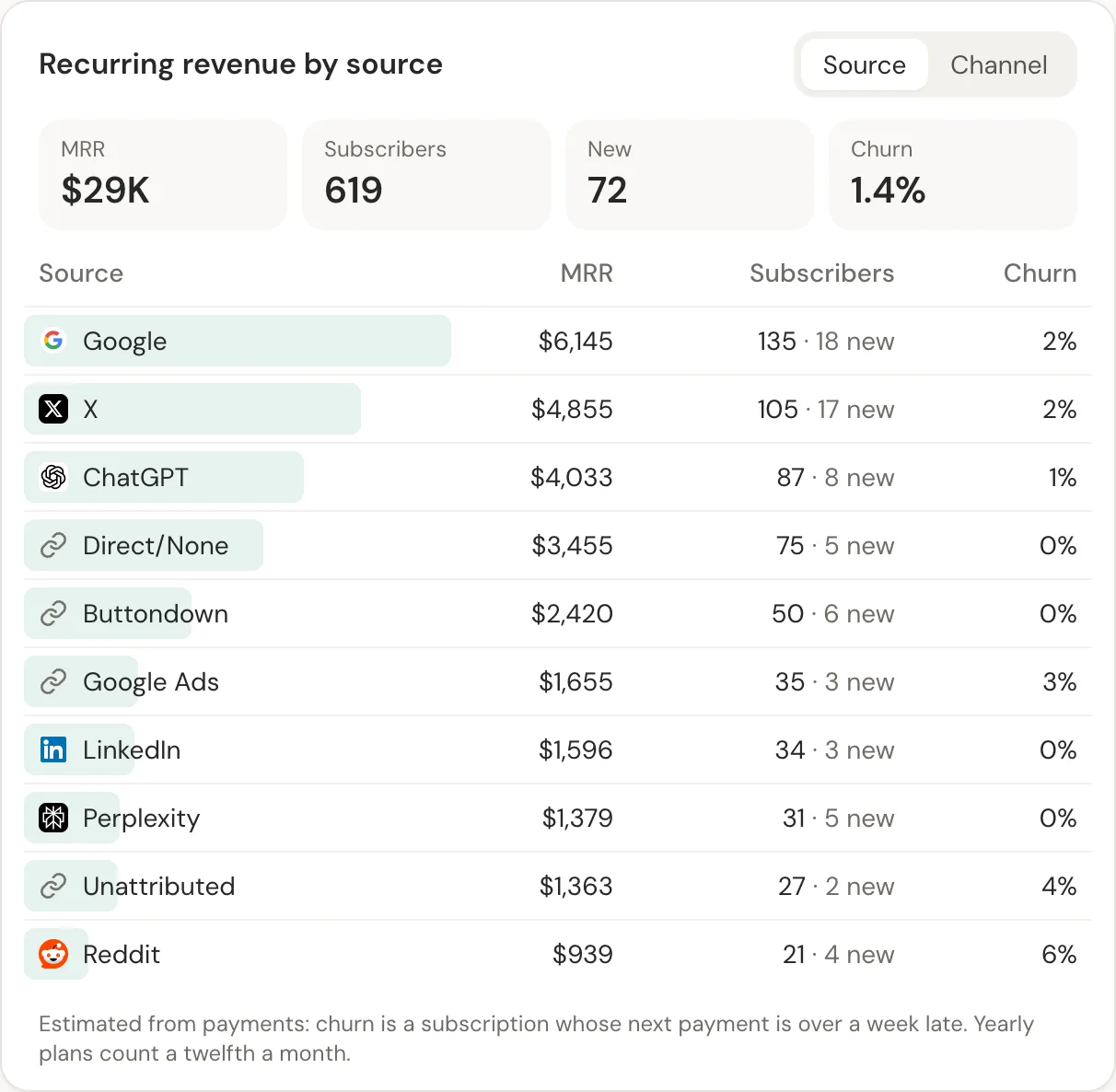
Read more about MRR by acquisition channel and revenue per visitor, the two numbers that matter most once Paddle revenue has a source.
Related guide: Paddle revenue attribution.
Questions
- Can Paddle show which channel a customer came from?
- Not from its dashboard. Paddle records what you pass in customData, so it needs an analytics tool on your site to supply the visitor and their source.
- Does this work with Paddle Billing and subscriptions?
- Yes. Transactions and subscription renewals arrive through the same webhook, so renewals keep the source of the first payment.
- What happens to payments without customData?
- They're reported as unattributed, so your totals stay complete and you can see how many payments still need the visitor id.