Guide · Revenue attribution
How to Track Revenue by Traffic Source (Without a Data Team)
A practical guide to seeing which channels bring paying customers, not just visitors: tag links, pass a visitor id to checkout, and match payments.
· 4 min read

Most analytics tools answer "where did my visitors come from?" The question that pays the bills is different: where did my customers come from? A channel that sends 2,000 visitors and no sales is worth less than one that sends 80 visitors and five sales.
This guide shows how revenue attribution works, what you can build yourself, and how to get the answer in about ten minutes with a tool.
Why visitor counts mislead
Traffic reports rank channels by volume. Volume is easy to grow and easy to misread:
- A Reddit thread can send a spike of curious readers who never buy.
- A newsletter mention can send 60 people, of whom four pay for a yearly plan.
- Organic search can look flat while it quietly brings most of your new subscriptions.
Until revenue sits next to each source, you are guessing. That is the whole case for revenue attribution: each payment is credited to the visit that led to it.
How revenue attribution works
Every method, homemade or bought, follows the same chain:
- 1Visitor arrivesThe referrer and any UTM tags say where they came from
- 2Visit is rememberedA visitor id is stored with that source
- 3Checkout carries the idThe id goes into the payment's metadata or a cart attribute
- 4Payment arrivesYour payment provider sends a webhook
- 5Revenue is creditedThe payment is joined to the visitor, and so to the source
The weak link is step 3. If the visitor id never reaches the payment, you are left matching by email or by time, which works sometimes and fails quietly the rest.
Step 1: tag the links you control
Referrers tell you about links you didn't create (search, other websites). For links you do create, add UTM parameters so they don't collapse into "direct":
utm_source: where the link lives (newsletter,x,producthunt)utm_medium: the kind of channel (email,social,cpc)utm_campaign: the specific push (black-friday-2026)
Keep the names lowercase and consistent. If links you tagged still show up as direct, this checklist covers the usual causes.
Step 2: pass the visitor to checkout
This is where most DIY setups stop. You need the visitor's id inside the payment:
- Stripe Checkout: put the id in
metadataorclient_reference_id. Stripe Payment Links accept UTM parameters in the URL. - Lemon Squeezy: use
checkout[custom]fields. - Paddle: use
customDatawhen you open the checkout. - Shopify and WooCommerce: a cart attribute or order meta.
With DataFair, the script tags checkout links for Stripe Payment Links, Lemon Squeezy, Gumroad, Creem and Dodo Payments automatically. For checkouts you create on your server, window.datafair.attribution() returns the ids to copy into metadata.
Step 3: receive payments and join them
Your provider sends a webhook for each payment. Something has to receive it, check its signature, find the visitor and store the result. Then you need refunds, subscriptions and disputes handled, or your numbers drift.
You can build this. Budget a few days, plus upkeep each time a provider changes an event. Or connect a tool that already does it: DataFair supports Stripe, Lemon Squeezy, Paddle, Dodo Payments, Polar, Creem, PayPal, Gumroad, Whop, Shopify and WooCommerce, plus a payments API for anything else.
Step 4: read the report the right way
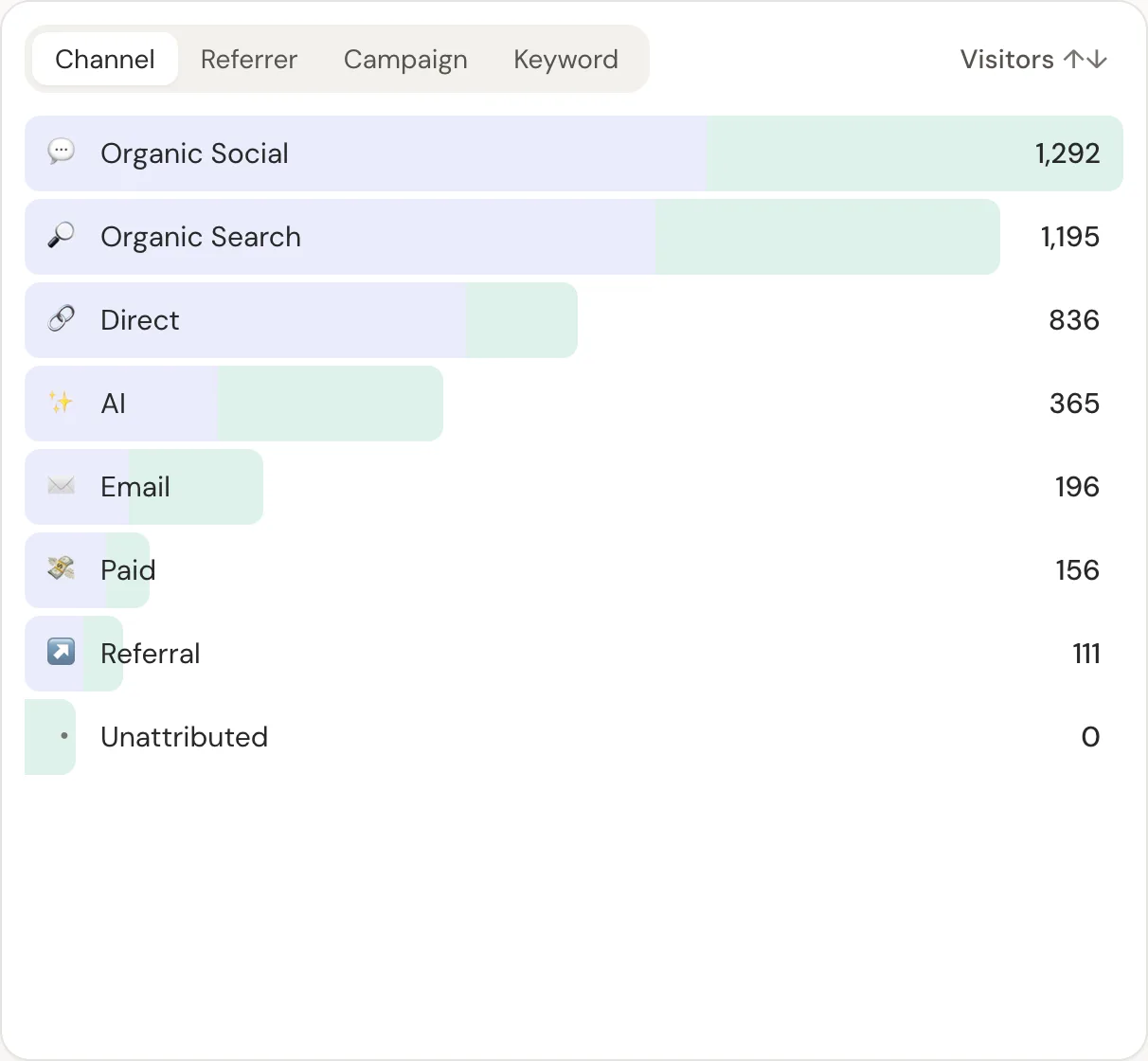
Once revenue sits next to sources, sort by revenue, not visitors. Then look at revenue per visitor for each channel. It lets you compare a big channel with a small one fairly. Here is how to calculate it.
Which visit gets the credit?
When a customer visits three times before buying, someone has to decide which visit earned the sale. Common answers:
| Model | Credit goes to | Good for |
|---|---|---|
| First touch | The first visit ever | Seeing what creates awareness |
| Last touch | The visit right before buying | Seeing what closes |
| Last non-direct | The last visit that came from somewhere | Small teams: simple and hard to game |
DataFair credits the last visit that came from somewhere, so a customer who found you on Google and later typed your URL is credited to Google, not "direct". Finding your best marketing channel walks through reading these numbers over 30 days.
What you can't attribute
Be honest about the gaps:
- Payments made on another device, with no email match, stay unattributed.
- Links shared in chat apps often arrive with no referrer ("dark social").
- Ad blockers stop some tracking scripts from loading at all.
A good report shows unattributed revenue as its own row instead of hiding it. If that row is large, fix step 2 first.
Questions
- Can Google Analytics 4 track revenue by traffic source?
- Yes, if you send purchase events with a value and they fire reliably. Many sites lose sales that happen on the payment provider's domain or through webhooks, so GA4 shows less revenue than your provider. A webhook-based tool records every payment the provider sends.
- Do I need UTM parameters if I use a revenue attribution tool?
- For links you share yourself, yes. Without them, clicks from emails, apps and some social sites arrive with no referrer and look like direct traffic.
- How long does setup take with DataFair?
- Adding the script takes a minute. Connecting a payment provider means copying one webhook URL and a signing secret, which takes a few minutes per provider.