Guide · AI traffic
How to Track ChatGPT Traffic to Your Website
Find visitors from ChatGPT, Claude, Perplexity and Gemini, understand why some land in "direct", and see whether AI referrals turn into revenue.
· 3 min read

More people now find websites through AI assistants. When ChatGPT, Claude or Perplexity cites your page and someone clicks, that's a visit like any other, as long as your analytics can recognise it. Here is how to find it, where it hides, and how to tell whether it's worth anything.
How ChatGPT visits arrive
A click from an AI assistant can reach you in three ways:
- With a referrer, such as
chatgpt.comorperplexity.ai. Easy to recognise. - With a UTM tag. ChatGPT adds
utm_source=chatgpt.comto many links it shows. Also easy. - With nothing. Clicks from desktop and mobile apps often carry no referrer and no tag. These land in direct, and no tool can recover them with certainty.
So every report of AI traffic is a floor, not the full number.
In Google Analytics 4
GA4 usually files ChatGPT clicks under Referral with the source chatgpt.com. To see AI traffic together:
- Open Reports → Acquisition → Traffic acquisition.
- Change the dimension to Session source.
- Add a filter for sources matching
chatgpt|openai|perplexity|claude|gemini|copilot.
For a lasting view, create a custom channel group with an "AI" channel defined by that same pattern, placed above Referral. GA4 doesn't do this by default.
In DataFair
DataFair groups AI assistants into their own AI channel automatically: ChatGPT, Claude, Perplexity, Gemini, Copilot, DeepSeek and Grok, by referrer and by UTM source. No setup.
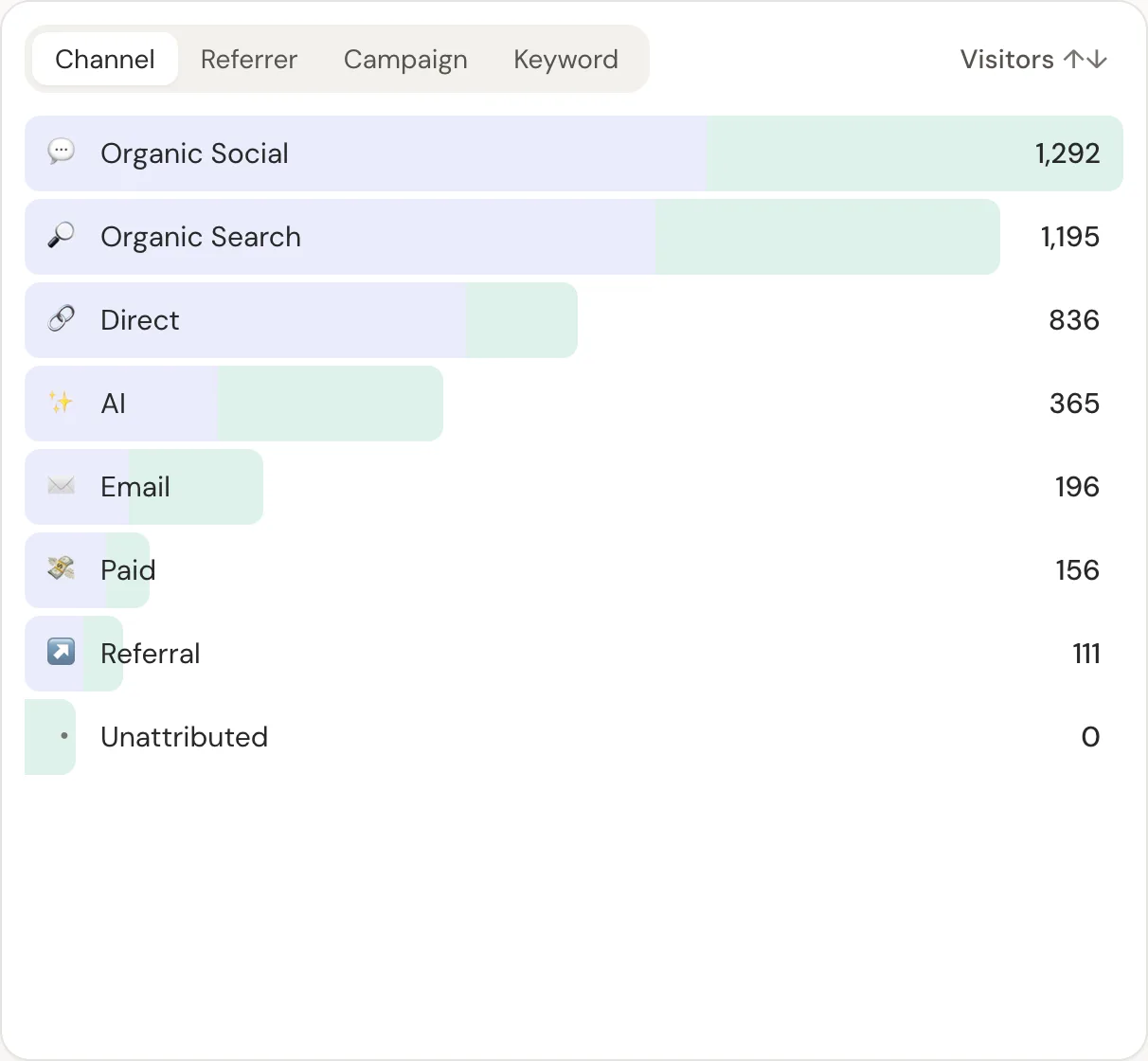
Because revenue sits next to every channel, you also see what AI visitors spend, not just how many arrive. That's the question that matters: does AI traffic convert?
Don't confuse visits with crawlers
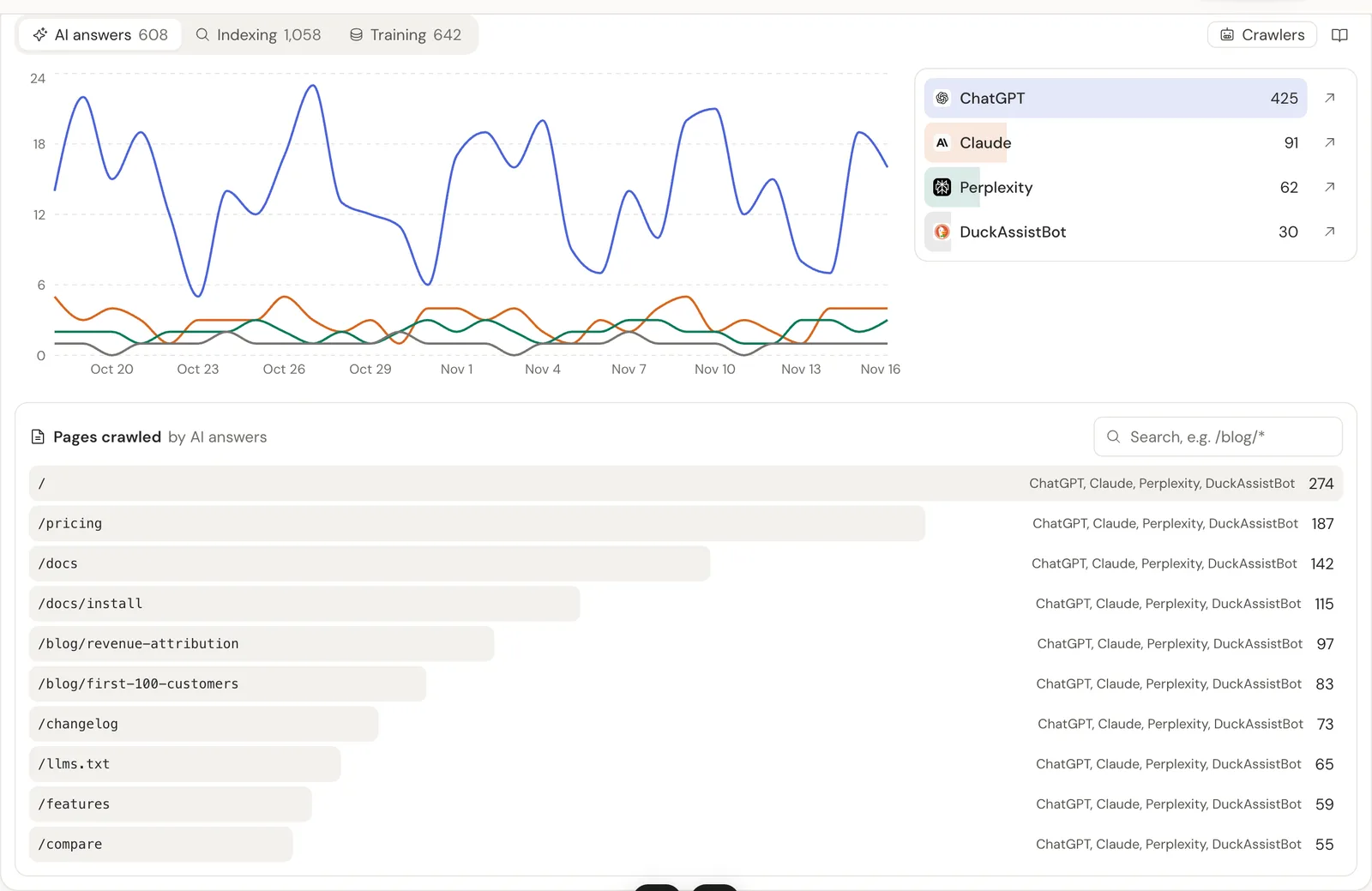
AI companies also send crawlers that read your pages without a person behind them: GPTBot for training, OAI-SearchBot for ChatGPT search, ChatGPT-User when someone's question makes ChatGPT open your page. Most of them don't run JavaScript, so script-based analytics never sees them.
They're worth counting separately: a page that ChatGPT-User fetches often is a page being cited in answers. DataFair's crawler panel counts them from your server and keeps them out of your visitor numbers. The full AI crawler list explains each one.
Recovering some of the hidden AI traffic
You can't tag links you don't control, but you can reduce the dark share:
- Watch direct traffic to deep pages. People rarely type long URLs. A rise in direct visits to a specific article, alongside AI crawls of the same page, is a strong hint.
- Ask new customers how they found you, with "ChatGPT" and "another AI assistant" as options.
- Check search keywords. Brand searches often rise after AI mentions, as people look you up afterwards.
If tagged links still show as direct, check these causes.
Related guide: AI traffic analytics: referrals, revenue and crawlers.
Questions
- Does ChatGPT send a referrer?
- Often, yes: web clicks usually show chatgpt.com, and ChatGPT adds utm_source=chatgpt.com to many links. App clicks often send nothing and land in direct.
- Is GPTBot a ChatGPT visitor?
- No. GPTBot is OpenAI's crawler for collecting training data. A person clicking a link in ChatGPT is a normal visitor, and ChatGPT-User is the agent that opens pages while ChatGPT answers someone.
- How do I get more traffic from ChatGPT?
- Write clear pages that answer specific questions, keep them crawlable without JavaScript, and make sure OAI-SearchBot isn't blocked in robots.txt. Then measure which cited pages bring visitors and revenue.